DevHeaders: Fast HTTP header editing for Chrome developers
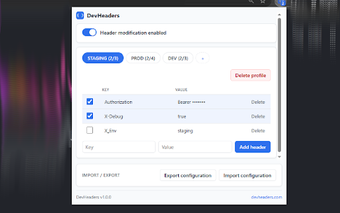
DevHeaders - HTTP Header Editor & Modifier, by devheaders.com, is a Chrome extension that lets developers and testers edit HTTP request headers on the fly for debugging and environment testing. It provides named profiles, a global master switch, and per-header checkboxes to apply different header sets quickly without changing application code. The interface focuses on rapid toggling and profile switching, aimed at QA engineers, API developers, and security testers who need targeted header control during development.
How does DevHeaders affect request handling and performance?
DevHeaders processes rules in the browser's networking layer, applying header changes locally on the device rather than routing traffic through external proxies. The local-first design eliminates outbound calls for rule execution and preserves responsiveness during normal browsing. Settings persist across restarts, so header rules remain available after closing the browser. The toolbar icon badge gives a quick visual cue about active state and number of enabled headers.
Does DevHeaders expose header data or collect telemetry?
The extension declares zero telemetry and makes no external network calls for its operation, so header values remain on the user's device. That design reduces the chance of accidental data leaks from the tool itself and aligns with local-first rule processing. This privacy posture suits debugging sessions that include sensitive tokens or authentication headers where avoiding external transmission matters.
How does DevHeaders help manage and share header configurations?
Header sets export to JSON, letting teams exchange exact rule sets or back up configurations. The editor accepts duplicate header keys intentionally, so testers can keep several variants and enable the correct entry for a run. A modern interface uses accent colors to identify different configurations, which helps when switching among staging, production, and feature-flag experiments during a session.
Who benefits from DevHeaders compared with broader network tools?
The extension concentrates on header manipulation rather than bundling request blocking, mocking, or response inspection, so it presents a compact interface with minimal feature clutter. That focus suits developers and QA professionals who need fast header changes without a larger debugging UI. Teams that require integrated traffic shaping or deep response analysis should use DevHeaders alongside a dedicated network inspector or proxy.
Final assessment: who DevHeaders serves best
DevHeaders is a practical choice for development teams working in Chromium-based browsers, given that it is available for Chrome and other Chromium derivatives. Its compact, privacy-minded design matches testers who need targeted header editing during API or environment testing. Teams that rely on non-Chromium browsers cannot use it directly, so document this compatibility constraint in onboarding to keep developer toolchains consistent across contributors.